Look at sold comps from the last 90 days for the average selling price and sell-through rate, compare their condition to yours, and count the current competition. Then price near the top of the range, about 5-10% below the highest comparable listing, instead of racing to the lowest price.
I listed a pair of cleats on eBay for $239.95. They sold within a minute. Literally, one minute.
I thought I'd nailed it. The sold comps showed $200-250 for this model, and I priced right in that range. Fast sale, good profit. Done.
Then I looked up the buyer. Another reseller who deals exclusively in cleats. He relisted my pair at $1,500.

That moment you realize the buyer knew something you didn't.
Now, the comps genuinely didn't support $1,500. His pair is still sitting there. But the fact that someone who specializes in this exact niche immediately bought mine tells me I was low. Maybe not $1,500 low, but I probably left $100-200 on the table.
That sale taught me something important: if an item sells instantly, you probably didn't price it right. A fast sale feels good, but it usually means a buyer saw a gap between your price and the item's true value before you did.
Why Most Sellers Get Pricing Wrong
There are two types of pricing mistakes, and most sellers make one or the other.
The first is pricing too low. These sellers want the fastest possible sale. They check comps, find the lowest sold price, and undercut it. Every listing is a race to the bottom. They sell fast and feel productive, but their margins are thin and they're training buyers to expect discounts.
The second is pricing too high with no research. These sellers look at what they paid, decide what they want to make, and list at that number without checking if anyone has ever paid that much. Their items sit for months. Eventually they get frustrated and blame the algorithm.
The right approach is somewhere in the middle, and it starts with data.
My 5-Minute Pricing Research
I do this for every single item I list. It takes about five minutes, and it's the difference between guessing and knowing.
Step 1: Check the Sell-Through Rate
I search for the item on eBay and look at sold listings for the last 90 days. The key number is sell-through rate: how many sold versus how many are currently listed.
If 50 sold in the last 90 days and only 10 are currently listed, demand is outpacing supply. I can price aggressively. If 10 sold and 200 are listed, the market is flooded and I need to compete harder.
This single number tells me more about pricing than anything else. High sell-through means I have leverage. Low sell-through means buyers have leverage.
Step 2: Find the Average Selling Price
I scan the sold listings and note three things: the average price, the high end, and the low end. I also check whether prices are trending up or down over the 90-day window.
Trending up means the market is heating up, maybe the item is being discontinued or it's seasonal. Trending down means supply is catching up or demand is dropping. Both affect where I set my price.
Step 3: Compare Condition
This is where most sellers stop, but it's where the real pricing intelligence starts.
I find a few sold listings that match my item's condition as closely as possible. Then I look at items that sold in worse condition. If a beat-up version sold for nearly the same price as a clean one, that tells me buyers care less about condition for this item. They just want it.
But if pristine items sold for 2-3x what rough ones did, condition is a major price driver and mine being in great shape is worth real money.
Step 4: Count the Competition
I switch from sold listings to active listings. How many people are selling this exact item right now, and in what condition?
This is the supply and demand check. If there are few to none listed and items have been selling recently, I can shoot for the moon. The buyers are there, the inventory isn't, and I can name my price.
If it's saturated, I lean heavily on condition to differentiate and price lower to move it before more sellers pile in.
The best scenario is low supply + recent sales + your item in great condition. When all three line up, you can price at the top of the range with confidence. These are the listings that make you glad you did the research instead of guessing.
Step 5: Set the Price Near the Top
Here's where I differ from most sellers: I almost always price near the high end of the range.
Not at the highest. I'll typically price 5-10% below whatever the current highest comparable listing is. This makes my listing look like the smart choice for buyers who are comparison shopping, while still capturing most of the value.
My 13-year-old put it best: "If it's priced too low, people think it's garbage or something's wrong with it. If it's too high, they'll dig deeper and search for better pricing."
She's right. There's a psychological sweet spot where your price signals quality without scaring buyers into comparison shopping. Sitting just below the top hits that spot.
This strategy works because I have excellent feedback, clear photos, and accurate descriptions. Buyers pay more from sellers they trust. If your feedback score is low or your photos are blurry phone shots, you'll need to compete more on price until you build that credibility. Quality packing is part of this too.
Why I Almost Never Reprice
Some sellers obsessively reprice their inventory every week, chasing every market fluctuation. I don't. If I did my research when I listed, the price was right.
Instead, I run a sale after 30 days. Everything that's been listed for a month gets a 20% markdown. This does a few things:
- Creates urgency. Buyers see the crossed-out original price and feel like they're getting a deal. That's more compelling than a listing that was just priced low from the start.
- Saves time. I'm not manually adjusting hundreds of listings. One bulk action and it's done.
- Keeps original value visible. A $50 item on sale for $40 feels different to a buyer than a $40 item. The original price anchors the perceived value.
If something hasn't sold after the sale period, that's when I reassess. Maybe the market shifted. Maybe I was too optimistic. But most of the time, 30 days plus a 20% sale is enough to move it.
When Comps Lie
That cleats sale taught me that comps aren't always the full picture. Here are the situations where I've learned to dig deeper:
Niche Items With Specialist Buyers
Some items have a buyer base that doesn't show up in general sold comps. Specialty cleats, vintage audio equipment, industrial tools — there might be a collector or specialist market that pays significantly more than the average eBay buyer. If you don't know that niche exists, you'll price for the mainstream and leave money on the table.
Seasonal Swings
Sold comps from July won't tell you what something sells for in December. Winter coats sell for more in October than in March. Sports equipment spikes at the start of the season. If you're listing something seasonal, weight your comps toward the same time of year.
Incomplete Sold Data
eBay only shows 90 days of sold data. For slow-moving items that sell once or twice a year, you might not see any comps at all. That doesn't mean the item is worthless — it means you need to check other platforms or expand your search terms.
That's exactly what happened with my cleats. If an item sells instantly, don't just celebrate — research why. You might be sitting on a niche you didn't know about.
What Good Pricing Actually Looks Like
I aim for items to sell within 30-60 days. Not instantly. Not after six months of sitting. That window tells me I priced correctly: high enough to capture value, competitive enough to attract buyers.
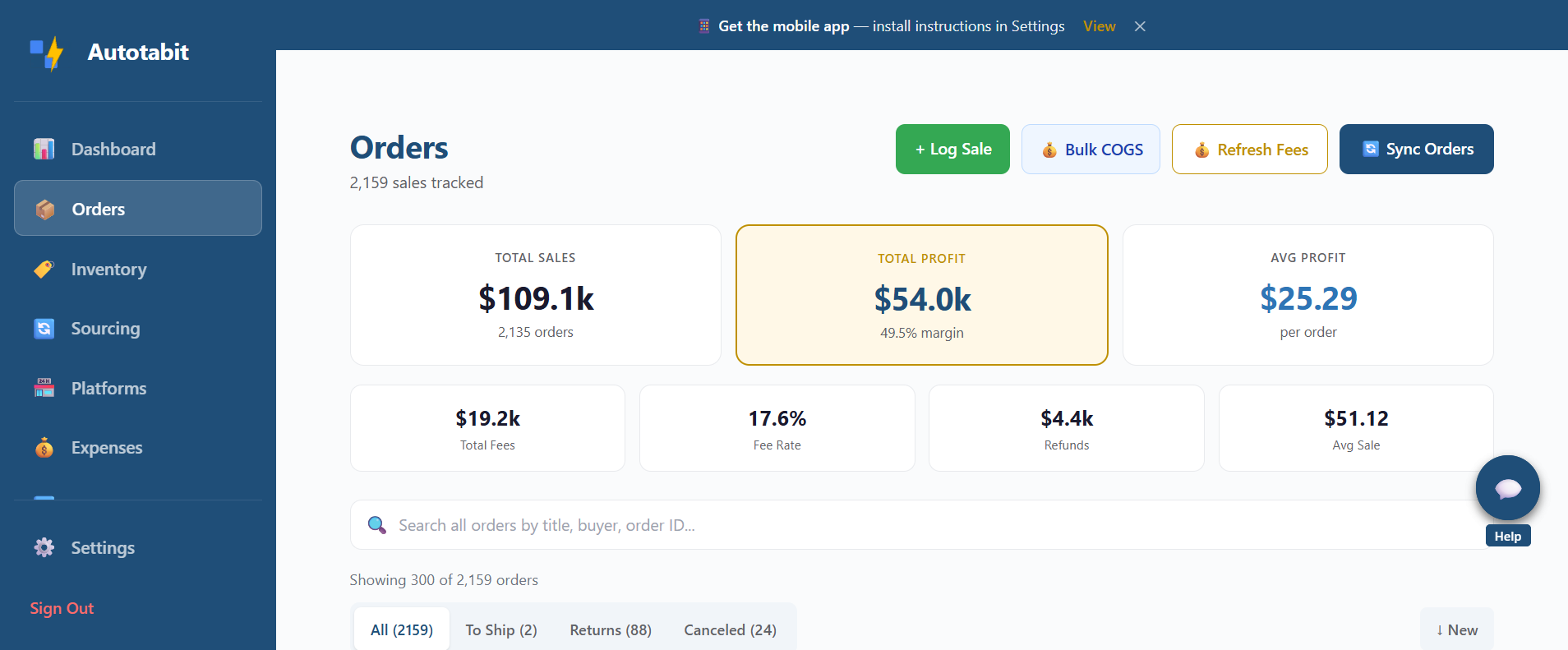
$109K in sales, $54K in profit — $25.29 average per order with consistent pricing
If everything is selling in the first week, I'm pricing too low. If nothing moves for 90 days, I'm pricing too high. The 30-60 day range is the sweet spot where I'm maximizing both volume and margins.
Tracking this is key. I know my average profit is $25.29 per order because I track every sale. Without data on how long items sit and what they actually sell for, you're guessing about whether your strategy works. You need to see patterns over time, not just individual wins and losses. (If you're not sure what to track, here's my breakdown of what actually counts as profit.)
The Pricing Checklist
Before You Hit "List"
- Sold comps (90 days) — What's the sell-through rate, average price, and trend?
- Condition check — How does your item compare to what's sold? Does condition matter for this item?
- Active competition — How many are currently listed? In what condition? At what price?
- Supply vs. demand — Few listed + recent sales = price high. Saturated + slow sales = price competitively.
- Set price 5-10% below top — Near the highest comparable, not at the bottom.
- Plan the 30-day sale — If it doesn't move in a month, 20% off before manually repricing.
Five minutes of research. That's all it takes to go from guessing to knowing.
Once you have a price in mind, the free eBay profit calculator shows what you'd actually keep after fees, ad fees and shipping. Or enter the profit you want, and it gives you the price to list at.
I do this for every item, and it's one of the reasons my average profit per item stays strong. The sellers who skip this step are the ones constantly wondering why their margins are thin or their items aren't moving. It's not the algorithm. It's not bad luck. It's pricing without data.
Do the research. Price with confidence. Let the comps tell you what the market will pay, and then position yourself near the top of that range.
Your items are worth what buyers will pay — but only if you take five minutes to find out what that number actually is.
Frequently Asked Questions
How do I price items on eBay?
Research sold comps for the last 90 days to find the sell-through rate and average selling price. Compare condition of sold items to yours. Count current competition. Then price near the top of the range, 5-10% below the highest comparable listing. Good feedback and quality photos justify higher prices.
Should I use the lowest price on eBay to sell faster?
No. Racing to the bottom signals to buyers that something is wrong with the item. Pricing too low makes buyers suspicious, while pricing too high makes them dig deeper and compare. The sweet spot is near the top of the market, where you capture serious buyers willing to pay for quality and reliable sellers.
How often should I reprice eBay listings?
Instead of manually repricing, consider running a sale after 30 days for 15-20% off. This is less work than individual repricing, creates urgency with crossed-out prices, and eBay sometimes boosts sale items in search results. If an item still hasn't sold after the sale, reassess the comp data.
What is sell-through rate on eBay?
Sell-through rate is the ratio of sold listings to total listings (sold + active) for a given item. A high sell-through rate means demand exceeds supply and you can price higher. A low sell-through rate means the market is saturated and you need to compete on price or condition.
How do I know if my eBay pricing strategy is working?
Track your average profit per item and your average days to sell. If items are selling within 30-60 days at strong margins, your pricing is working. If everything sells within minutes, you're probably leaving money on the table. The goal is consistent sales at the highest sustainable price.
Know Your Numbers. Price With Confidence.
Autotabit tracks your eBay sales, profit per item, and days to sell automatically — so you can see if your pricing strategy is actually working.
Start FreeQuestions about pricing your eBay listings? Contact me using the link in the footer — I read every message.