Order Management

Auto-Sync Orders from eBay

Connect your eBay account once and your orders sync automatically. Up to 2 years of history imported in minutes—no manual data entry.

  • Up to 2 years of order history
  • Automatic fee reconciliation (eBay fees, ad fees, shipping)
  • Refund detection and tracking
  • Days-to-sell calculation for every item
  • Daily automatic sync keeps data fresh
Profit Tracking

Know Your Real Profit on Every Sale

eBay shows revenue, but not true profit. Autotabit calculates what you actually keep after ALL costs—fees, shipping, COGS, and refunds.

  • Automatic eBay fee calculation
  • Promoted listings ad fee tracking
  • Shipping label cost deduction
  • COGS (Cost of Goods Sold) per item
  • ROI percentage on every sale
Profit Dashboard
Inventory

Sync & Track Your Inventory

Your active eBay listings sync automatically. Track days listed, COGS, potential profit, and identify items that are sitting too long.

  • Automatic inventory sync from eBay
  • Days listed tracking per item
  • Total inventory value calculation
  • Estimated profit projection
  • Identify slow-moving inventory
  • Storage locations with a Location filter
  • Catches listings eBay removed without notice
Sourcing

Track Sourcing Trips & COGS

Log your sourcing trips, track spending by store, and automatically assign COGS to inventory items. Know which sources are most profitable.

  • Look up solds from a photo: snap an item in the store (or upload a photo on a computer) and jump to its eBay sold listings
  • Max buy price: type the sold price and see the most you can pay after eBay fees and shipping, using your own profit goal
  • Multi-stop trip logging
  • Track spending by source/store
  • Tag inventory items to trips (even items that already sold)
  • See which trip each sale came from
  • Bulk COGS screen to fill in missing costs fast
  • Per-unit costs for multi-quantity listings, with cost batches when you buy more at a new price
  • ROI by source location
  • Mileage tracking for tax deductions
Sourcing Dashboard
Multi-Platform

Track Sales Beyond eBay

Sell on Poshmark, Mercari, Facebook Marketplace, or local? Log those sales too and see your complete business picture in one place.

  • Add custom platforms with fee structures
  • Log manual sales from any platform
  • Platform-specific profit tracking
  • Combined dashboard for all sales
  • Compare performance across platforms
  • Reminder to delist items that sold elsewhere
Multi-Platform Sales Tracking
Tax Reports

Tax-Ready Reports for Schedule C

Generate reports for tax season with all your income, COGS, expenses, and mileage deductions organized and ready to go.

  • Annual income summary
  • COGS deduction totals
  • Year-end inventory: starting, bought, ending, and what was sold, donated or discarded
  • Ending inventory locked each year, so last year's numbers stay put
  • Expense tracking by category
  • Quarterly breakdown
  • Standard mileage or actual car costs - your choice each year
  • Estimated self-employment tax
  • eBay 1099-K check: see if your form matches your orders, month by month
  • One-click download for your accountant: report plus every order, expense, trip and unsold item
Tax Center
Listing Tools

End & Relist Stale Inventory

Refresh your listings to boost visibility. End old listings and relist with updated prices, or use Sell Similar for a complete listing makeover with AI optimization.

  • Pick how long listings have been up and see the oldest first
  • Filter by watchers and past relists
  • Relist Results: see how many relisted items sold and how fast
  • Bulk select and process multiple listings
  • Quick relist with optional price change and a below-cost warning
  • eBay's reason for any failed relist, with a one-tap fix in Sell Similar
  • Sell Similar: edit photos, item specifics, category, condition, and policies
  • Units check before relisting, so you never list more than you have
  • AI-powered title and description optimization
  • COGS and trip links move to the new listing
End & Relist: relist listings that have been up for 60+ days, 265 match, the 50 oldest shown, three selected with Sell Similar and Relist buttons
Marketing Tools

Auto Promote

Set it once and let listings that aren't selling get promoted on their own. Every morning, Autotabit adds listings past your day count to your Promoted Listings campaign at your ad rate, and skips the ones that would make less than your minimum profit.

  • Promote after the days you pick, counted from the first listing, even after a relist
  • Profit guard: skip items that would make less than your minimum after eBay fees and the ad fee
  • Or promote every listing past the day count, no profit check
  • Limit it by price range, eBay category or title words
  • Preview what would be promoted today before you turn it on
  • Leave any item out with one switch, and stop any time: keep the promotions or take them off
  • Prefer to choose? Promote up to 50 listings at a time by hand
Learn more →
Auto Promote settings: skip items that would make less than $5 after eBay fees and the ad fee, optional filters, and the next run preview: 120 listings would be promoted and 3 skipped for low profit
Listing Tools

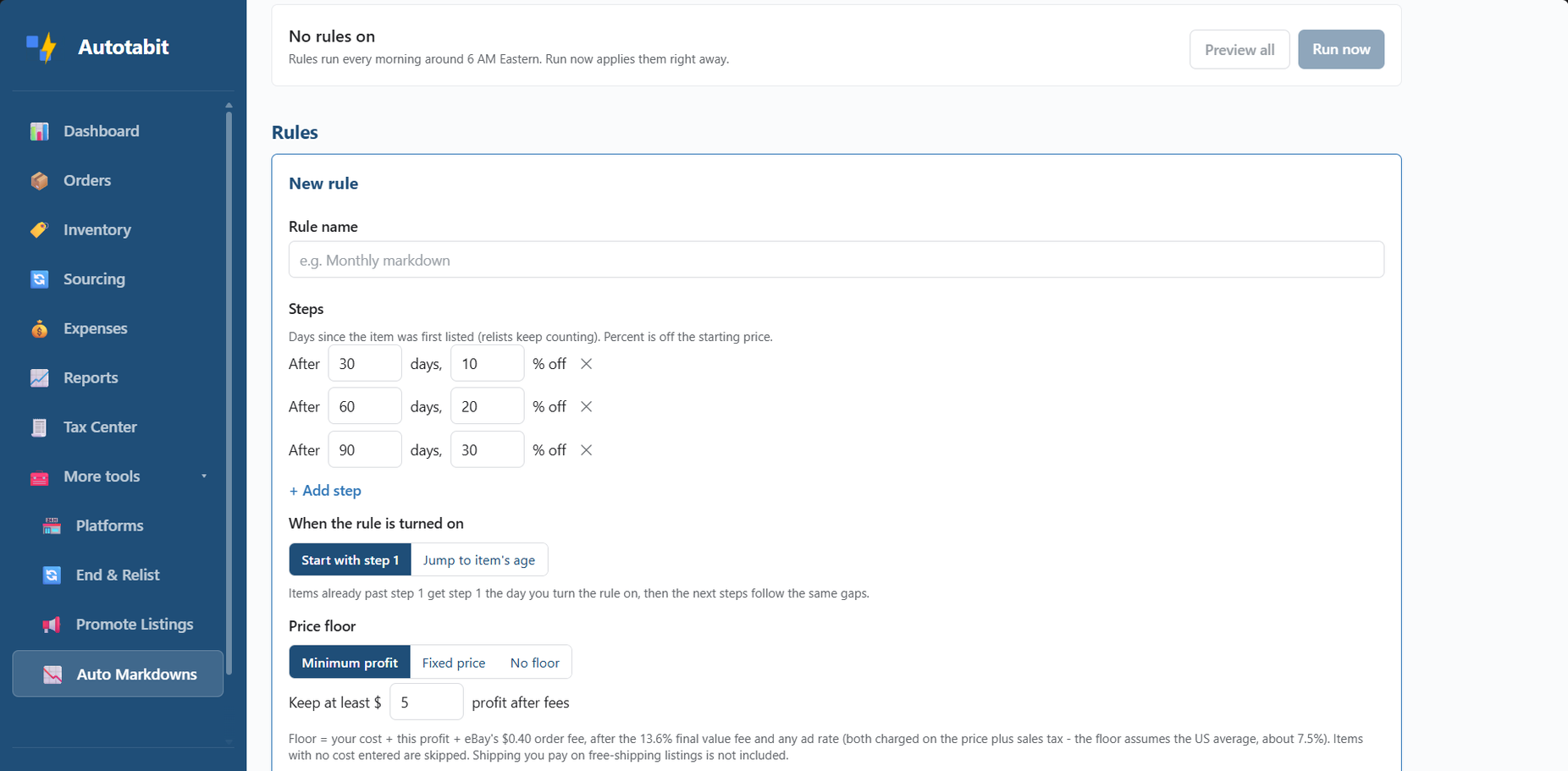
Auto Markdowns

Set it once and let unsold items step down in price on their own. Every morning, Autotabit lowers prices by your rules, never below the floor you choose, and keeps a price history you can undo.

  • Step ladders like 30 days 10% off, 60 days 20%, 90 days 30%
  • Days count from the first listing, even after a relist
  • Price floor: keep a minimum profit after fees, a fixed price, or none
  • Limit a rule by price range or title words
  • Preview every change before you turn a rule on
  • Price history with one-tap undo, plus a badge on each marked-down item
  • Daily To Do note with the prices lowered that morning
Auto Markdowns rule editor: steps after 30, 60 and 90 days at 10%, 20% and 30% off, and a price floor that keeps at least $5 profit after fees
Share

Share Cards

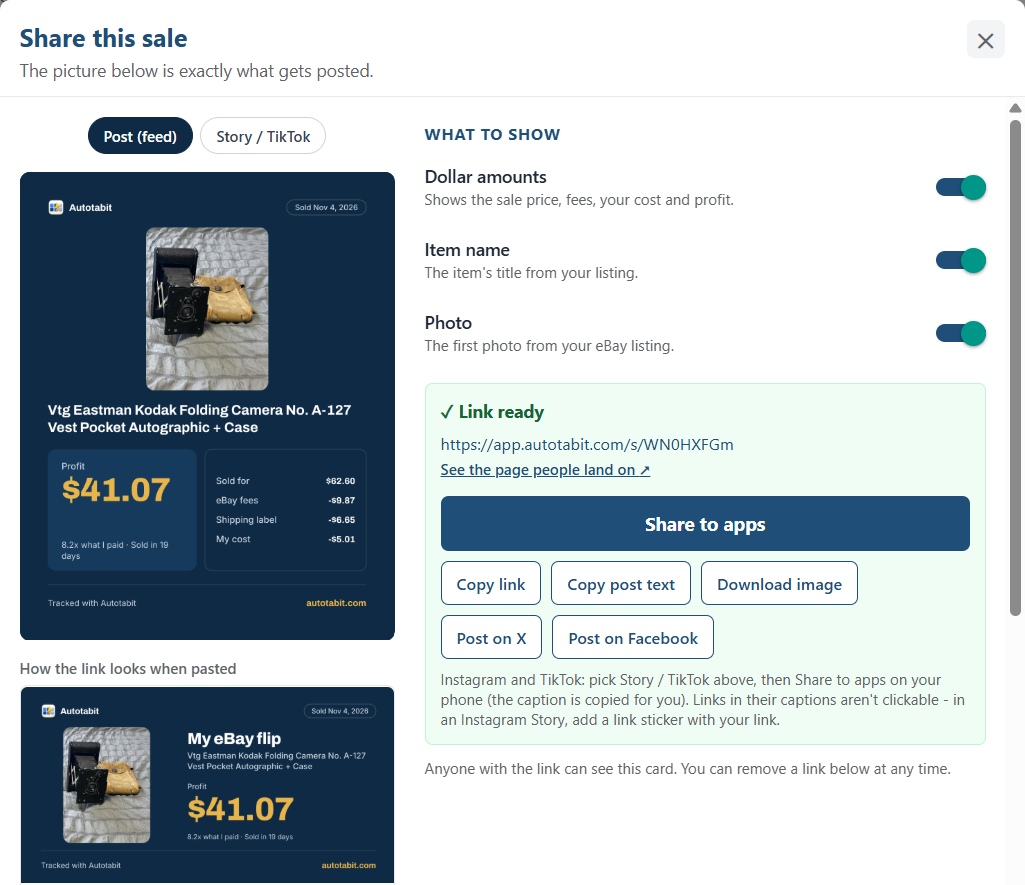
No more taking screenshots and editing them. Autotabit's share feature turns a period's profit, a single sale, or a whole sourcing trip into a clean picture with a link, using the same numbers Autotabit calculates.

  • Share from the Dashboard, any order, or any sourcing trip
  • You choose what shows: dollar amounts or just margins, item names, listing photo, store names
  • Feed post and Story / TikTok sizes, plus a link preview
  • Share to apps, X, Facebook, or download the picture
  • Never shows order numbers or buyer names
  • Take a shared card down anytime, and its link stops working
Share this sale screen: a sale card with photo, profit $41.07 and fees, switches for dollar amounts, item name and photo, and buttons to share, copy the link, download the image, or post on X and Facebook

Everything Included

🤖

AI Support Chat

Ask how to use any feature, or ask about your own numbers: "What was my profit last month?", "What sold yesterday?" or "Was I charged for a return label?" Answers 24/7, and when you need a real person, it opens a support ticket for you.

See real answers →
✨

AI Listing Optimizer

Better titles and descriptions from AI that reads your listing photos, keeps every real detail, and flags a tag that doesn't match your title. Right from Inventory or Sell Similar.

Learn more →
📷

Photo Lookup

Snap an item while you shop, or upload a photo on a computer. AI reads the brand, tag and style code and writes the search, then one tap opens eBay's sold listings for it. 30 lookups a month free, 500 on paid plans.

How it works →
🧾

Auto Expense Categories

Type a description or store and Autotabit picks the category for you. Tap to change it anytime.

Learn more →
💲

Bulk COGS

See every item missing a cost, search by title, and fill them in at once, including sold orders.

Learn more →
🔎

Missing Listing Check

A daily check finds listings eBay removed without notice and adds them to your To Do, so your inventory stays accurate.

Learn more →
✅

Dashboard To Do List

Orders to ship, duplicate shipping labels to void, shipped orders missing a label cost, ended items to account for, items missing costs or locations, and listings to promote, one tap away.

Learn more →
📊

KPI Dashboard

At-a-glance metrics including revenue, profit margin, ROI, average days to sell, and fee rates.

Learn more →
🔄

Auto Fee Refresh

Fees update automatically as eBay processes transactions and refunds.

Learn more →
📦

Sold Item Tracking

Items move from inventory to orders automatically when they sell.

Learn more →
🏷

Source Management

Save your frequent sources with default mileage for quick trip logging.

Learn more →
💵

Expense Tracking

Log business expenses like shipping supplies and software, search them by date and category, and auto-add your eBay Store subscription and other eBay fees.

Learn more →
🔒

Secure OAuth

Industry-standard eBay OAuth connection. We never see your password.

Learn more →
☁

Your Data, Exportable

Export your data anytime. Your data belongs to you.

Learn more →
📱

Works Everywhere

Full features on any device. Install as a PWA on your phone.

🌐

eBay US, UK, Australia & Germany

Your numbers in your own currency. The app is in German for eBay.de sellers.

📈

Income Statement

Detailed P&L breakdown showing exactly where your money goes.

Learn more →

eBay Sold Prices From a Photo, in Three Taps

The usual way takes nine steps: Google's photo search, scrolling mixed results, copying a title, searching eBay and filtering to sold. In Autotabit you open the app, tap Take photo and tap Search eBay sold. AI writes the search for you.

See all AI features →

You Stay in Control of the AI

AI in Autotabit is a helper, not a decision-maker. Here's exactly how it works.

✓It only suggests

AI writes a suggested title or description, and you edit it, copy it, or push it to eBay yourself. Expense categories it picks are labeled "AI suggested" and you can change them with one tap.

✓It sees only what it needs

Each feature sends just the piece it's working on, like your chat question or the listing you're optimizing. Your password, payment details and eBay login are never sent.

✓Your data isn't used to train AI

Autotabit uses Claude by Anthropic through Anthropic's paid business service, which doesn't use your data to train its AI.

✓One switch turns it off

AI is on by default, but you can turn it off in Settings. You'll lose the AI features, including the AI support chat, but you can still email us at support@autotabit.com anytime. Nothing is sent to Anthropic, and your syncing, profits and reports keep working as normal.

More about AI and your data →

Ready to Know Your Real Numbers?

Start free today. No credit card required.

Start Free →