The closest it gets, and how many clicks it takes, from an eBay seller who went and checked.
By Tim, founder of Autotabit. eBay seller for over 25 years. Updated November 2026.
The short answer
Not quite. It gets close, then stops.
Seller Hub shows your sales, the tax, eBay's fees, your labels and what eBay pays you. What it doesn't count is what you paid for the item, unless you typed that into each listing on eBay before it sold, and it doesn't know about anything you buy outside eBay.
Seller Hub can also be overwhelming. Across the top there's Overview, Orders, Listings, Marketing, Advertising, Store, Performance, Payments and More, and it's hard to remember what's under each one. It gives you a roundabout number for what you make, mixed in with your views, how your advertising is doing and everything else, so much on one page that it's hard to filter down to what you need.
You want to know how your week went. Not your sales, what you actually made.
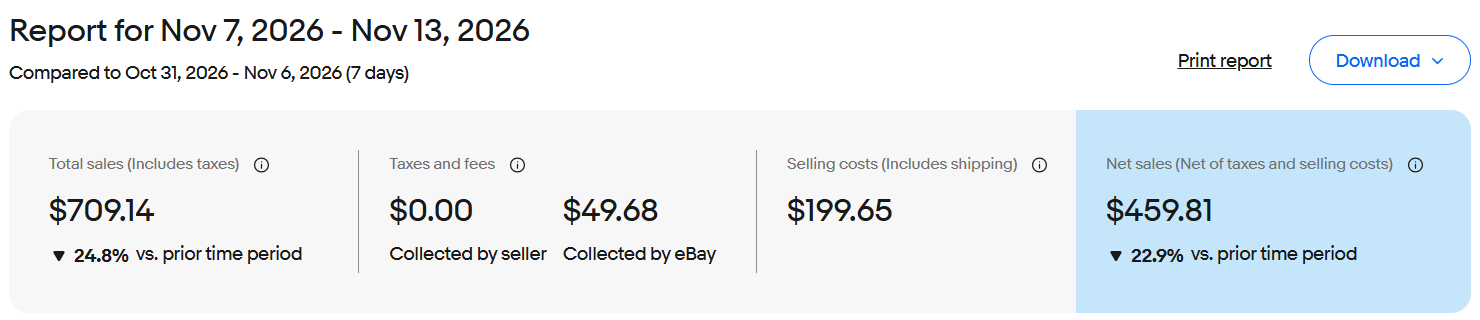
In Seller Hub, I click the weekly total, and it opens a sales report. For November 7 to 13, 2026, it showed total sales of $709.14 including taxes, $49.68 in taxes collected by eBay, $199.65 in selling costs including shipping, and $459.81 in net sales.
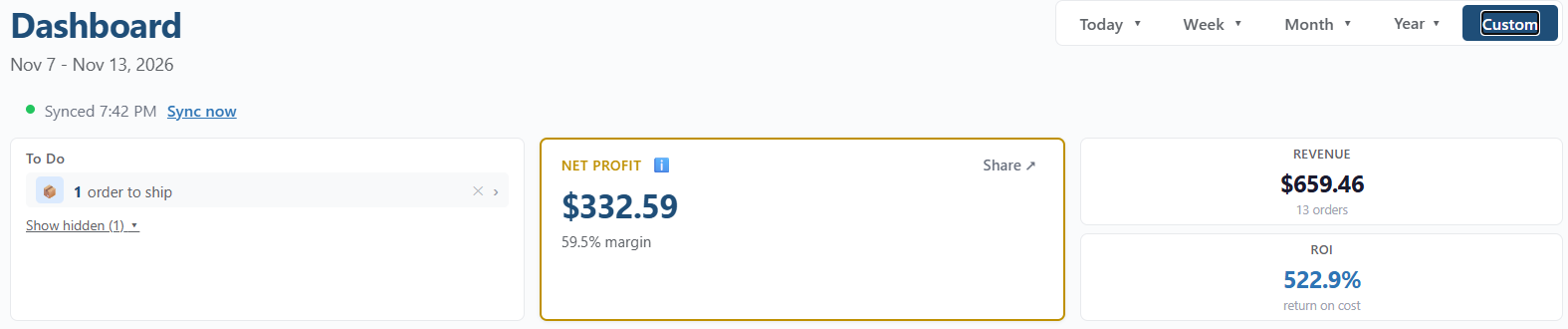
That last box sounds like profit. Then I opened Autotabit for the same dates.
Nov 7-13, 2026
Seller Hub
Autotabit
Sales
$709.14, with tax
$659.46, tax left out
Taken out
Tax, and $199.65 in selling costs
eBay fees, ad fees and labels
What I paid for the items
Not counted
$75.03
My other expenses
Not counted
$59.77
The number at the end
$459.81 "net sales"
$332.59 net profit
The sales match: $709.14 minus the $49.68 in tax is the same $659.46. The difference is at the bottom. The number Seller Hub calls net was about $127 more than what I actually made that week, because it doesn't know what I paid for the items or what I spent on things like shipping boxes.
Seller Hub's sales report for the week.The same week on the Autotabit Dashboard. Cost of goods and expenses are further down the page.
What did I make on that one?
A real order: $29.78 in Seller Hub, $22.78 profit
Something sold, and you want to know what you made on it.
In Seller Hub, the order card shows the item, the subtotal and shipping, and the total the buyer paid. To see what you earned, you have to click View order details and scroll down. For an Olympus xD picture card I sold on November 12, 2026, the buyer paid $47.21: $34.95 for the card, $8.07 shipping and $4.19 sales tax. After the sales tax, transaction fees, shipping label and ad fee, Seller Hub showed order earnings of $29.78.
That's as far as Seller Hub goes. It doesn't take out what I paid for the card. And before an item ships, the label isn't in there yet either. To be honest, just walking through this in Seller Hub for this page, I got confused and lost my place, and I had to start over.
Seller Hub
Autotabit
1. Open Orders and find the order
1. Open Orders and tap the order card
2. Click View order details
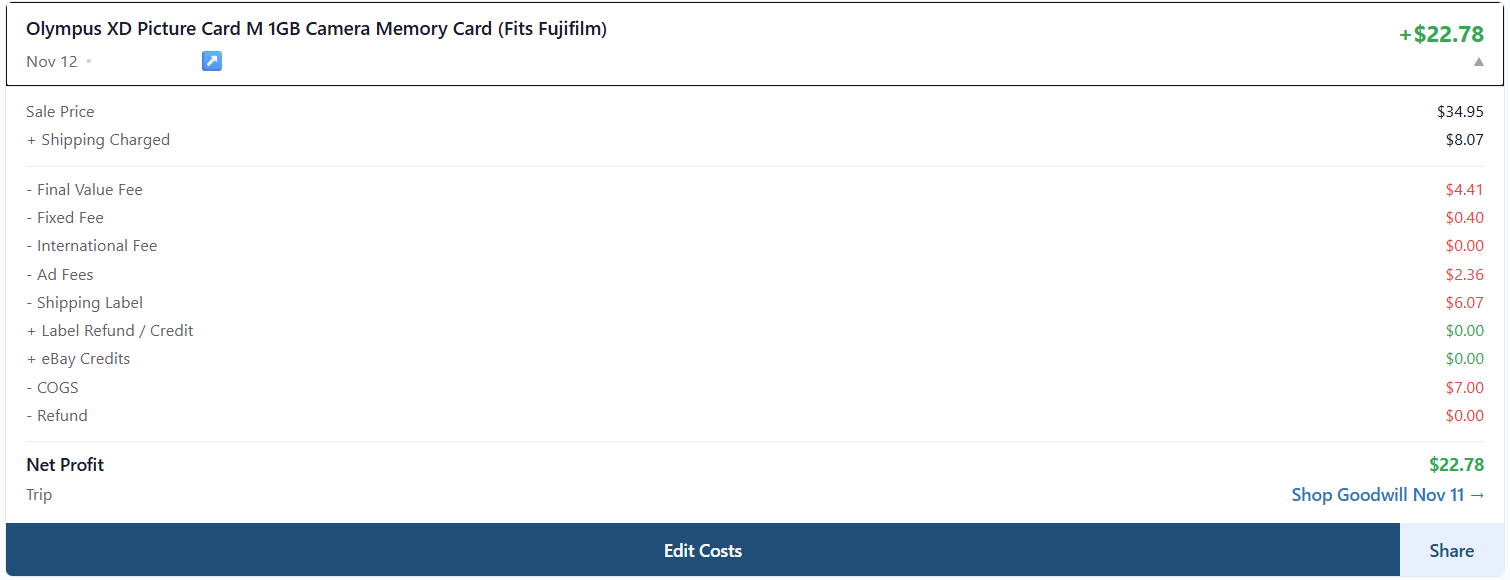
2. Every fee, the label, the cost and the net profit are on the card
3. Scroll down to the earnings section
4. Order earnings: $29.78. What you paid isn't in it
Net profit: $22.78, after the $7.00 the card cost me
The same order in Autotabit, opened from the Orders tab. The buyer's name is covered.
To be fair to eBay
eBay's Your Cost field: closer, if you use it
You've heard eBay lets you enter your cost now.
It does. In December 2025, eBay added an optional Your Cost field to the listing form in the US. If you add your cost to a listing before it sells, Seller Hub shows it in that order's details and in the Earnings report under Payments.
Even when you do use it, it only covers what you typed into each listing on eBay, before it sold. Things you buy outside eBay, like shipping boxes from Walmart, aren't in it, and neither is a cost you only figure out after the sale.
How it works in Autotabit: your eBay orders sync in with every fee, ad fee and label, line by line. Your cost stays in Autotabit, not on eBay: type it on the item, fill in many at once with Bulk COGS, or tag items to a sourcing trip so the trip's spend is split across them. It can be added or changed after the sale too, and the order's profit updates. Add your other costs in Expenses, and the Dashboard shows net profit for any dates you pick: today, a week, a month, a year or your own range.
Where it falls short
A lot that doesn't stay the same size
You buy a lot, split the cost across the items, and list a few. Then the count changes.
eBay does get close, and with Your Cost, a seller who uses it would get very close. What it doesn't take into consideration is how sourcing actually goes. Say I'm out sourcing and find six things, so I log the trip as six items at whatever I paid. When I get home, I list a few and put my cost in. If I was just using eBay, I'd put the cost in per item, split the way I thought it would be. Then I find out there's something wrong with one of the items and I can't list it. Now I have to go back into eBay, on every one of those listings and orders, and raise that cost.
Or take the camera lot I bought the other day. I thought I was going to get five good items out of it, and I ended up getting seven. If I'd listed a few of them at first and then found out at the end that I actually got seven good items, I'd have to go back and fix every one of them. In Autotabit, I can just do it very easily.
How it works in Autotabit: in Sourcing, change the stop's number of items or the amount spent, and the cost is split again across the items tagged to that stop. Items you gave their own cost keep it. The listings update, and so do sold orders that were still at the old split, so their profit updates too.
Questions
Seller Hub profit questions
Does eBay Seller Hub show profit?
Not on its own. Seller Hub shows sales, taxes, eBay's fees, labels and what eBay pays you. It only subtracts what you paid for an item if you typed that cost into eBay's optional Your Cost field before the item sold, and it doesn't include expenses you pay outside eBay.
What does net sales mean in eBay Seller Hub?
In Seller Hub's sales report, net sales is your total sales minus taxes and eBay's selling costs, which include shipping labels. It does not take out what you paid for the items, so it is not your profit.
Where do I see what I earned on one eBay order?
In Seller Hub, open Orders, click View order details on the order and scroll down to the earnings section. Order earnings take out sales tax, transaction fees, ad fees and, once the item has shipped, the shipping label.
See your real profit
Connect your eBay account and your orders come in with every fee and label. Free up to 30 listings. No credit card required.