A listing can disappear because eBay removed it for a policy reason, a system glitch dropped it, or it ended without your records catching it. Policy removals come with a message in eBay Messages and your email, but glitches usually come with no notice. The only sure check is comparing your active listings to eBay's, item by item.
You list an item. It shows as active in your records. You count it in your inventory value. You figure it's out there waiting for the right buyer.
Except it isn't. eBay removed it, or a glitch swallowed it, or it ended weeks ago and nothing told your records. It isn't in search. Nobody can buy it. And you won't notice until you go looking for it.
I've sold on eBay for over 25 years, and a listing that quietly stops being a listing is one of the easiest problems to miss. One Autotabit user only found out when she tried to end a listing that eBay had already removed. That's why Autotabit now checks for it.
Quick Checklist: Missing Listings
- Read every eBay policy message — a removal notice is easy to lose among buyer messages and promos.
- Compare your active count to eBay's — if your records say 350 and eBay says 344, six listings are missing.
- Confirm with eBay before you act — during glitches, live listings can look gone and gone listings can look live.
- Fix the reason before relisting — relisting a removed item without fixing the problem can bring account restrictions.
- Check that the item is still on your shelf — before a relist, make sure you can actually ship it.
Three Ways an eBay Listing Goes Missing
1. eBay removes it for a policy reason
eBay's listing policies say eBay sometimes removes listings that break its rules, and that it sends a message to your eBay Messages and your email explaining why. That's fair. The problem is that the notice lands in the same place as buyer questions, offers, and eBay promotions, and it's easy to skim past.
Removals aren't always right, either. One seller on the eBay Community had 56 listings pulled under the product safety policy over what looked like a case of mistaken identity. They won the appeals, but the listings still showed as removed and couldn't be relisted as they were.
2. An eBay glitch hides or drops it
This one happens more than you'd think. Value Added Resource reported in September 2026 that new listings were getting item numbers but not showing up in Active listings or search, and ended items were taking hours to move. eBay acknowledged it was investigating. The same report noted a similar delay in November 2025.
Earlier, in 2021, sellers reported Good 'Til Cancelled listings vanishing when they were due to renew, missing from both Active and Unsold. One seller said around 3,000 listings were affected.
3. It ended, but your records never caught up
If you track inventory in a spreadsheet, or in any tool that only adds new listings and never checks old ones, an item that ends on eBay can stay "active" in your records forever. Your inventory value is inflated, your active count is off, and you lose track of an item that may be sitting on your shelf doing nothing.
What a Missing Listing Costs You
- Sales you're not getting. A listing that isn't live can't sell, no matter how good the price is.
- Wrong numbers. Your active inventory value and listing count include items nobody can buy.
- Lost items. The longer a missing listing goes unnoticed, the less likely you'll remember where the item is.
- Account risk if you relist blindly. If eBay removed it for a policy reason, putting the same listing back up without fixing the problem is the kind of repeat violation that eBay says can lead to warnings, restrictions or suspension.
When a listing goes missing, find out why first. If it was a glitch, relisting can create a duplicate once the original shows back up. If it was a policy removal, read eBay's message and fix the issue before listing it again. Your account is worth more than one sale.
How to Find Missing eBay Listings
The manual way works: compare the number of active listings in your records to the number in Seller Hub, and if they don't match, go hunting. It's slow, and it only tells you that something is missing, not which item.
Autotabit does the comparison for you, item by item.
Step 1: Full sync finds the gaps
When you run a Full Sync (All Active) on the Inventory screen, Autotabit pulls every active listing from eBay and compares it to every item it has marked Active. Anything Autotabit thinks is active that eBay didn't return gets flagged. Items scheduled to end within a day are skipped, so normal end dates don't set it off.
You don't have to remember to run it. With Auto Sync on (it is by default), Autotabit runs this full sync once a day while the app is open, and anything it flags shows up as a Listings not found on eBay line in the Dashboard To Do box. Tap it to open the same window.
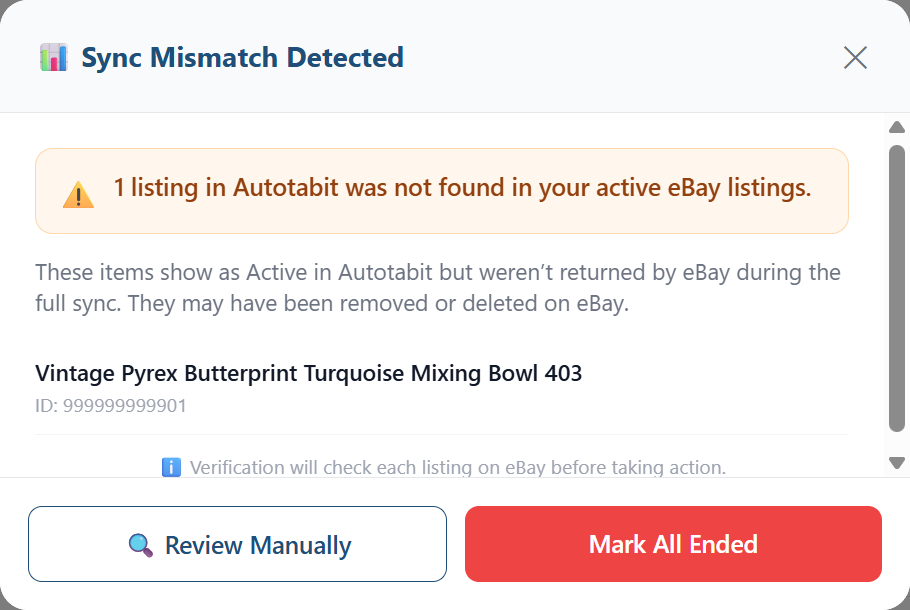
The "Sync Mismatch Detected" window lists each item eBay didn't return (a test item I added to my own account)
Step 2: Each item is checked with eBay
Not being in the sync isn't proof that a listing is gone. So whichever button you choose, Review Manually or Mark All Ended, Autotabit first asks eBay about each flagged item directly. The results are sorted three ways:
- Confirmed gone on eBay — these are the ones you act on.
- Still active on eBay — Autotabit will not end these. That matters during glitches like the September one, when listings existed but didn't show where they should.
- Couldn't be verified — skipped, so nothing changes based on a guess.
Step 3: You decide what happens to each one
Choose Review Manually and the Inventory screen filters down to just the confirmed-gone items, each marked "Not found on eBay" with three choices:
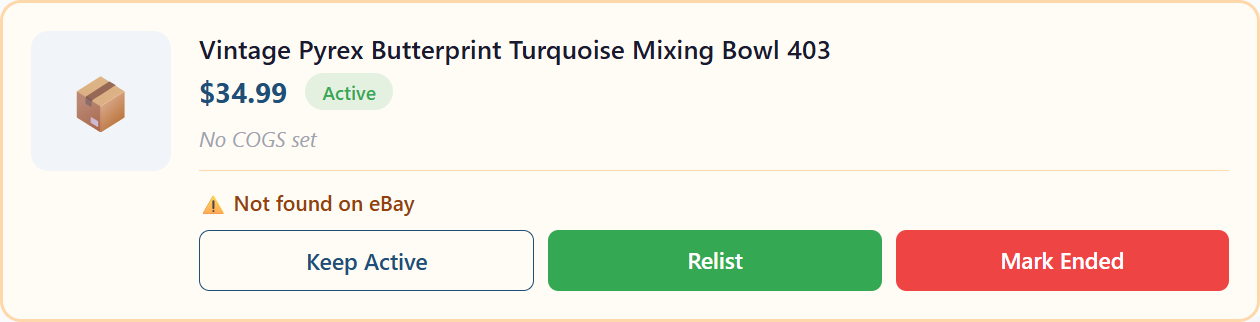
The same test item in review: Keep Active, Relist, or Mark Ended
- Relist puts it back on eBay with a new item number. Autotabit first reminds you to make sure the item is still in stock, and the relist keeps the item's cost, notes, source and sourcing trip, so your profit tracking stays intact.
- Mark Ended updates your records so the item stops counting as active inventory.
- Keep Active leaves it alone if you know something Autotabit doesn't.
If eBay removed the listing for a policy reason, Autotabit won't relist it from the app. It tells you to relist it directly on eBay, which is where you'd fix whatever eBay flagged in the first place. Once it's back up, the next sync picks up the new listing and carries the item's cost and sourcing details over to it.
Autotabit can't tell you why eBay removed a listing. eBay's message has the reason. What Autotabit does is make sure you know the listing is gone, so the message doesn't stay unread and the item doesn't sit on your shelf for months.
A Simple Routine
- Every day: skim eBay Messages for anything from eBay itself, not just buyers.
- When it shows up: open Listings not found on eBay in the Autotabit Dashboard To Do and deal with what it flags. Auto Sync checks once a day while the app is open.
- Before any relist: confirm the item is on your shelf and you know why it went missing.
- During eBay outages: don't rush to relist. Wait for things to settle, then sync again.
Missing listings are a quiet problem. They don't cost you a defect or a bad review. They just slowly cost you sales and leave your numbers wrong. And if you crosslist, the same "is it really live?" question works in reverse, which is how items end up selling twice.
Frequently Asked Questions
Why did my eBay listing disappear?
The most common reasons are a policy removal, an eBay system glitch, or the listing ending without your records being updated. If eBay removed it for a policy reason, eBay says it sends a message to your eBay Messages and your email explaining why.
Does eBay tell you when it removes a listing?
For policy removals, yes. eBay's listing policies say it sends a message to your eBay Messages and your registered email. Glitches are different: listings that are delayed or dropped by a system problem usually come with no notice.
Should I relist an item eBay removed?
Only after you've read eBay's message and fixed the problem. eBay's policies say activity that breaks its rules can lead to warnings, restrictions or suspension, and relisting the same problem listing is a fast way to repeat a violation.
How do I find listings that are missing on eBay?
Compare your active listings to eBay's, item by item. In Autotabit, Auto Sync does this once a day while the app is open (or run a Full Sync on the Inventory screen), and it checks each missing item with eBay before you take any action.
Will Autotabit end a listing that's still live?
No. Every flagged item is checked with eBay first. Items eBay says are still active are never ended, and items that can't be verified are skipped.
Know Every Listing Is Really Live
Autotabit syncs your eBay inventory, flags listings that went missing, and checks each one with eBay before anything changes.
Start FreeHad a listing go missing on eBay? Contact me using the link in the footer — I read every message.